
Every Shopify store loses money in small, invisible ways. A discount code stacked on top of a free-shipping threshold by a browser extension. A customer who returns 80% of their orders. A product that quietly stopped selling three weeks ago. A coupon meant for one segment that ended up on a deal site overnight. None of these set off an alarm in the Shopify admin, because nothing technically went wrong.
Multiply enough of these across a year and the gap between what your store made and what it should have made adds up to a number nobody likes to see. This is the case for a weekly revenue leak scan, and why “something feels off this month” is usually the right instinct.
The leaks Shopify dashboards do not surface
Shopify’s analytics show you totals, trends and basic segmentation. They are good for reporting and bad for finding leaks. A leak scan looks for patterns that totals hide:
- Coupon abuse from browser extensions. Honey, Capital One Shopping, Piggy and others stack codes onto checkouts that should have paid full price. Your conversion rate looks great while your margin quietly shrinks.
- Refund-fraud patterns. A small number of customers driving an outsized share of returns and chargebacks. They never look bad individually, only in aggregate.
- Revenue and order drops by segment. Repeat customers are spending less, or one product disappeared from the top sellers, or your average order value drifted down by 8% over four weeks.
- Zero-sales gaps. A product that should be moving has not had an order in days. A collection that quietly went stale.
- Abandoned-checkout windows. The percentage of starts that never finish, and which carts you could have recovered.
Spotting a dead product is only half of it. If a line has genuinely run its course rather than dipped for a week, the fix is a replacement, not a rescue, and that turns a reporting problem into a sourcing one. Tools like Sell The Trend’s winning-products research exist for exactly that half of the job.
Each of these is fixable, but only if you spot it before the month closes.
Why these leaks stay invisible
Three reasons most stores never catch them.
The first is that Shopify reports are aggregate. Totals tell you the destination, not the path, so a 4% margin drop driven by extension coupon-stacking looks like noise on a busy weekend.
The second is that anomalies do not trigger anything. You have to go looking. Most merchants only do that when something feels wrong, by which point the leak has been bleeding for weeks.
The third is that you need to know what to look for. Coupon abuse, refund fraud and segment drift each have different fingerprints. Spotting them takes time you would rather spend on the store.
What a revenue leak scan actually does
A leak scan automates the part of analytics that nobody enjoys: comparing this period to the last and surfacing the anomalies that matter.
The basic shape is simple. Pull orders, customers and products for the last 7 days. Pull the same window from the 7 days before. Run comparisons across revenue, orders, AOV, repeat customers, products, zero-sales gaps, coupon usage, refund risk and abandoned checkouts. Anything that moved outside its normal range gets flagged.
The part that turns a list of anomalies into something useful is the explanation. A flag that says “AOV dropped 12% this week” is a fact. A flag that says “AOV dropped 12% because returning customers shifted to a lower-priced product after Friday’s promo expired” is an action. The best scans give you plain-English summaries plus a short list of quick wins, so you spend the day fixing the leak instead of staring at a chart.
How to add it without code
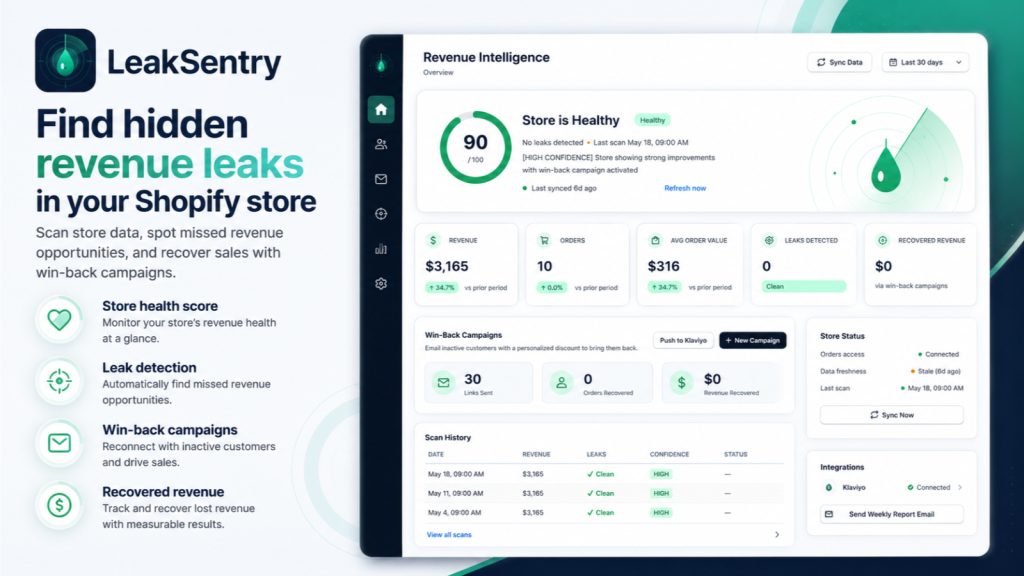
You do not need a BI tool or a data team to do this. LeakSentry, our revenue leak scanner for Shopify, installs as a theme app embed and starts scanning straight away. It compares each 7-day window to the previous one, flags nine kinds of leak (drops in revenue, orders, order value, repeat customers and products; zero-sales gaps; coupon abuse from Honey, Capital One and Piggy; refund-fraud risk; and abandoned checkouts), and writes a plain-English summary with the top three quick-win fixes for the week.
There is a free plan with one scan per month, and a Pro tier at $29/month with unlimited scans, Klaviyo segments, one-click win-back campaigns and weekly email summaries. You can install LeakSentry from the Shopify App Store and have your first leak report in a few minutes.
Which stores benefit most
Most stores would learn something from a single scan, but the payback is largest for:
- Stores running discounts or promotions, which attract browser-extension coupon stacking and segment drift after a sale ends.
- Stores with returns or refunds, where a small number of customers can quietly eat a large share of margin.
- Multi-currency or high-volume stores, where small percentage drifts add up to real money fast.
- Anyone who has noticed “something feels off this month” without being able to put a finger on it. That feeling is usually right.
If your store has flat traffic and a single product, a leak scan will not change much. If shoppers, products, promotions and refunds are all moving at once, anomalies are happening every week. The question is whether you find them before or after they show up in the monthly P&L.
The takeaway
Revenue leaks do not announce themselves. They look like a small margin dip, a slightly slower week, a customer who never came back. By the time they show up as a number you can see, weeks of money are already gone. A weekly leak scan turns that pattern from invisible to obvious, and gives you a short list of fixes you can actually act on. If your store could be quietly losing more than it should, LeakSentry is built to surface it.
LeakSentry
Weekly AI scan that surfaces coupon abuse, refund fraud and revenue drops, with quick-win fixes. Free plan.
Install LeakSentry on Shopify →See full app details