
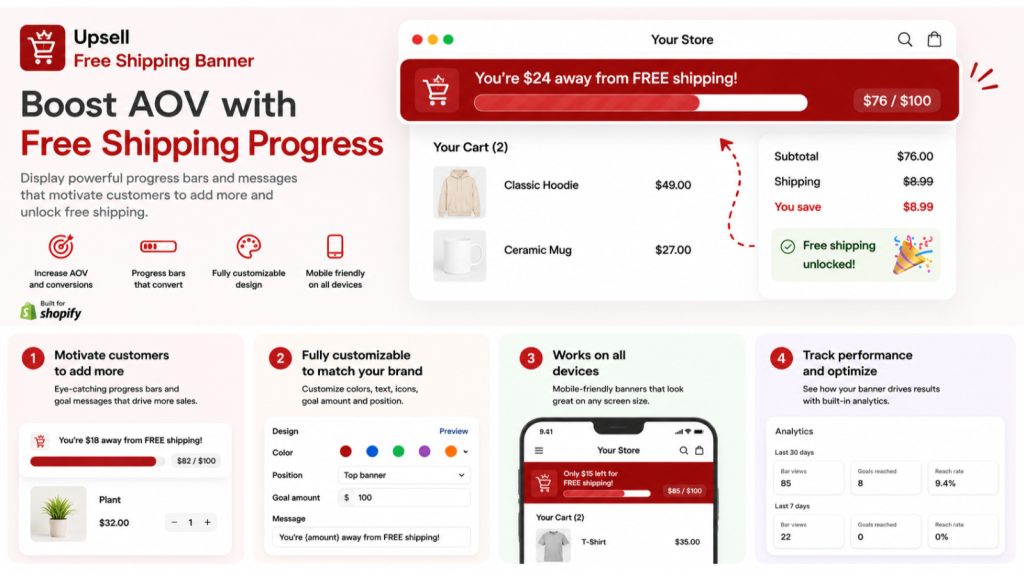
Free shipping is the most reliable cart motivator in ecommerce, and most Shopify stores use it wrong. They either give it away on every order, which quietly eats margin, or they bury a flat “$50 for free shipping” line in the footer where nobody sees it. The money is in the middle: a threshold set at the right number, shown at the right moment, that nudges shoppers to add one more item.
This is a short, practical guide to picking that number and making it actually lift average order value, rather than just costing you shipping.
Why a free shipping threshold lifts AOV
A threshold works because of a well-documented behaviour: once a shopper is close to a reward, finishing it feels better than the small extra cost. A cart at $42 with free shipping at $50 creates an $8 gap that the shopper, not you, wants to close. They add a item to avoid “wasting” the progress they have already made.
The catch is that this only works if two things are true: the threshold is set just above your current average order value, and the shopper can see their progress toward it in real time. Get either wrong and the effect disappears.
How to calculate the right threshold
The single most common mistake is picking a round number that feels nice ($50, $100) instead of one based on your actual data. Here is the method that works:
- Find your current AOV. Shopify Analytics shows it under Reports. Say it is $46.
- Set the threshold 15 to 30 percent above it. For a $46 AOV, that is roughly $55 to $60. Close enough that most shoppers can reach it with one more item, far enough that reaching it means a real lift.
- Check it against your margin. The extra revenue from a higher cart needs to more than cover the shipping you are now giving away. If your margin is thin, lean toward the higher end of the range.
- Round to a clean number just above the calculation. $55 reads better than $54.20 and the rounding works in your favour.
Set the threshold too low and you give free shipping to orders that would have hit that size anyway. Set it too high and shoppers see the gap as impossible and ignore it. The 15 to 30 percent band is the sweet spot for most stores.
Why a static banner does not work
“Free shipping over $55” written once at the top of the page is information. A progress bar that updates as the shopper adds items is motivation. The difference is large.
A live bar does three things a static line cannot. It shows the exact gap remaining (“$9 away from free shipping”), so the shopper knows precisely how close they are. It updates with every cart change, which turns adding items into visible progress. And it stays present through the browsing and cart stages, so the goal is in view at the moment the add-to-cart decision happens. That continuous feedback loop is what actually changes behaviour.
Common mistakes to avoid
- A threshold below your AOV. If free shipping kicks in under your average cart, you are discounting orders that already cleared the bar.
- Hiding the bar at checkout only. By checkout the shopper has decided. The bar has to be visible while they browse and build the cart.
- One global number for every market. A $55 threshold makes sense in USD and nonsense in another currency. Multi-currency stores need per-market goals.
- Set and forget. AOV drifts. Re-check the threshold every quarter and after any major pricing change.
That last one is the mistake almost everyone makes, because a quarterly re-check is exactly the kind of small recurring task that falls off the calendar. If you are already leaning on store automation for the other jobs that only happen when something reminds you, this belongs on the same list.
Setting it up on Shopify without code
You do not need to touch theme code to add a live progress bar. AOV Free Shipping Bar Upsell, our free shipping bar app for Shopify, installs as a theme app extension and shows a bar that updates with every cart change. You set the goal, pick the currency, customize the colours and message, and go live in under a minute. It places site-wide, on product pages, or in the cart, and built-in analytics track bar views and goal-reached events so you can see whether your threshold is working.
There is a free plan to test it on your own traffic, and per-country shipping goals for Shopify Markets stores on the higher tier. You can install it from the Shopify App Store and have a working bar before you finish your coffee.
The takeaway
Free shipping lifts average order value only when the threshold is set just above your current AOV and the shopper can watch their progress toward it. Pick the number from your data, not a round figure. Show it as a live bar, not a static line. Re-check it each quarter. Done right, it is one of the few changes that pays for itself in the first week. If you want the live bar without the code, AOV Free Shipping Bar Upsell is built for exactly this.
AOV Free Shipping Bar Upsell
Live free-shipping progress bar that updates with every cart change and nudges shoppers to add one more item. Free plan.
Install AOV Free Shipping Bar Upsell on Shopify →See full app details