
Shopify has a built-in blog, and turning it on takes about two minutes. The catch is that it is deliberately basic, and if you want a blog that actually pulls in search traffic and keeps readers on your site, you will hit its limits quickly. Here is how to add a blog to Shopify, where the native one falls short, and the apps that fill the gaps.
How to add Shopify’s built-in blog
Every Shopify store already includes a blog engine. To start using it:
- From your admin, go to Online Store → Blog Posts.
- Click Create blog post. Shopify puts new posts in a default blog called “News”. Use Manage blogs to rename it or add another (for example “Blog” or “Guides”).
- Write the post and set the title, content, featured image, excerpt, tags, and the SEO title and description, then publish or schedule it.
- Add the blog to your menu: Online Store → Navigation, open your main menu, and add a link to the blog.
That is the whole setup. You now have a working blog on your Shopify domain.
Where Shopify’s native blog falls short
It works, but next to a dedicated platform like WordPress it is thin:
- Basic editor and structure. One level of “blog”, simple tags, no real categories, and a limited editor.
- Limited SEO control. Fewer on-page controls than a plugin like Yoast or Rank Math gives you on WordPress.
- Weak related posts. Shopify shows related posts by date, not by topic, so readers hit dead ends instead of the next relevant article.
- No plugin ecosystem. You cannot extend it the way WordPress lets you.
For a light blog, that is fine. For content as a real acquisition channel, those gaps cost you engagement and rankings.
Apps that make the Shopify blog better
A few app types close the gaps, depending on what you need:
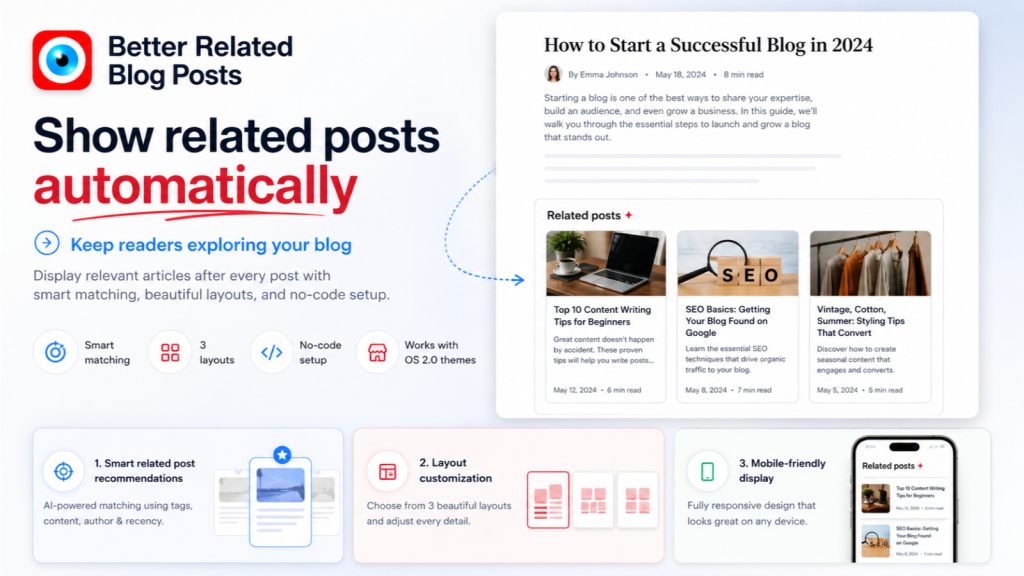
- Better related posts. Shopify’s date-ordered “related posts” send readers to your newest article, not the most relevant one. Better Related Blog Posts swaps that for content-aware recommendations, which keeps readers moving through your content and lifts pages per session.
- Keep using WordPress. If you already have a WordPress blog, or you simply prefer WordPress for writing, you do not have to rebuild it inside Shopify. Simple WordPress Blog Feed displays your WordPress posts on any Shopify page, on your own domain, with no subdomain and no iframe. You write in WordPress and it shows up on Shopify.
If you are weighing WordPress against Shopify’s blog, our guides on running a WordPress blog on Shopify and migrating from WordPress to Shopify go deeper on the trade-offs.
Which approach should you pick?
- Just starting, light content: use Shopify’s native blog, and add a related-posts app so readers do not bounce after one article.
- Serious about content, or already on WordPress: keep WordPress for writing and display it on Shopify, so you get WordPress’s tools and Shopify’s storefront on one domain.
Either way the goal is the same: a blog that brings in search traffic and moves readers toward your products.
FAQ
Does Shopify have a blog?
Yes. Every Shopify store includes a built-in blog under Online Store → Blog Posts. It is available by default. You just create posts and add the blog to your menu.
Is the Shopify blog good for SEO?
It can rank, but it gives you less on-page control than WordPress, and its date-based related posts waste internal-linking opportunities. Strong content plus a related-posts app closes most of the gap.
Can I use WordPress for my Shopify blog?
Yes. You can keep writing in WordPress and display those posts on your Shopify store, which avoids rebuilding your blog inside Shopify’s simpler engine.
Adding a blog to Shopify is the easy part. Getting one that actually earns traffic and keeps readers takes a little more: lean on the native blog for simple needs, add a related-posts app to stop dead ends, and keep WordPress if that is where your content really lives.
Simple WordPress Blog Feed
Prefer WordPress for your blog? Show your WordPress posts on any Shopify page, on your own domain. No subdomain, no iframe. Free trial.
Install Simple WordPress Blog Feed on Shopify →See full app details